Meet OpenAI Agent Builder: Build Smart AI Agents Without Coding





Artificial intelligence is evolving faster than ever, and OpenAI’s new Agent Builder marks a major leap forward, bringing the power of AI creation within everyone’s reach. Announced at DevDay 2025, Agent Builder is part of a broader ecosystem called AgentKit, a toolkit that allows anyone to design, test, and deploy intelligent agents without writing extensive code.
If you’ve ever imagined creating your own AI assistant that can plan, act, and make decisions for you, Agent Builder turns that idea into reality. Let’s explore what this new tool does, how it works, and why it could redefine the way we build with AI.
What are AI Agents?
Before diving into Agent Builder, it’s worth revisiting what an AI agent really is and why this concept is so powerful. You’ve probably used AI tools that chat, answer questions, or generate content. But an agent goes further: it can reason, plan, and act autonomously across multiple steps or tools to achieve a goal.
For example:
- A customer support agent that reads an incoming email, categorizes its type, looks up relevant database records, drafts a response, and sends it.
- A research assistant that fetches web data, filters it, summarizes insights, and writes a brief report.
- A financial agent that monitors prices, triggers trades (in a safe sandbox), and raises alerts.
(If you’d like a deeper exploration of how agents work and how to build them, check out our earlier article “The Power of AI Agent and How to Build AI Agents”.)
What makes these systems true “agents” is their ability to chain reasoning, memory, and actions together. They don’t just follow scripts, they make context-based decisions and adapt as they go. Here are the essentials that define an agent:
- Perception: Gathers data from text, APIs, or other sources.
- Reasoning: Decides what to do next, using logic and inference.
- Action: Executes tasks such as retrieving data or triggering tools.
- Goal orientation: Works toward a specific objective.
- Autonomy: Learns or adjusts with minimal supervision.
Until recently, building such agents required coding and complex integrations. OpenAI Agent Builder changes that, allowing anyone to design intelligent workflows visually, much like creating a flowchart where the system can think and act for itself.
Introducing AgentKit: The Ecosystem Behind Agent Builder
Agent Builder isn’t a standalone feature; it’s part of a larger toolkit called AgentKit, which brings together everything you need to create, deploy, and monitor AI agents. Think of AgentKit as the “operating system” for building intelligent assistants.
At the heart of AgentKit are several core components:
- Agent Builder: the visual interface where you design how your AI behaves and which tools it uses.
- ChatKit: a module for embedding conversational agents into your app or website.
- Connector Registry: which manages integrations with external APIs, data sources, and tools securely.
- Evaluation tools: which help test and measure your agent’s performance, trace its reasoning, and improve accuracy.
Together, these tools form an end-to-end environment for agent development, from early prototyping to production deployment. The big idea is to make the process of creating useful, safe, and autonomous agents as simple as assembling Lego blocks.
Inside Agent Builder: How It Works
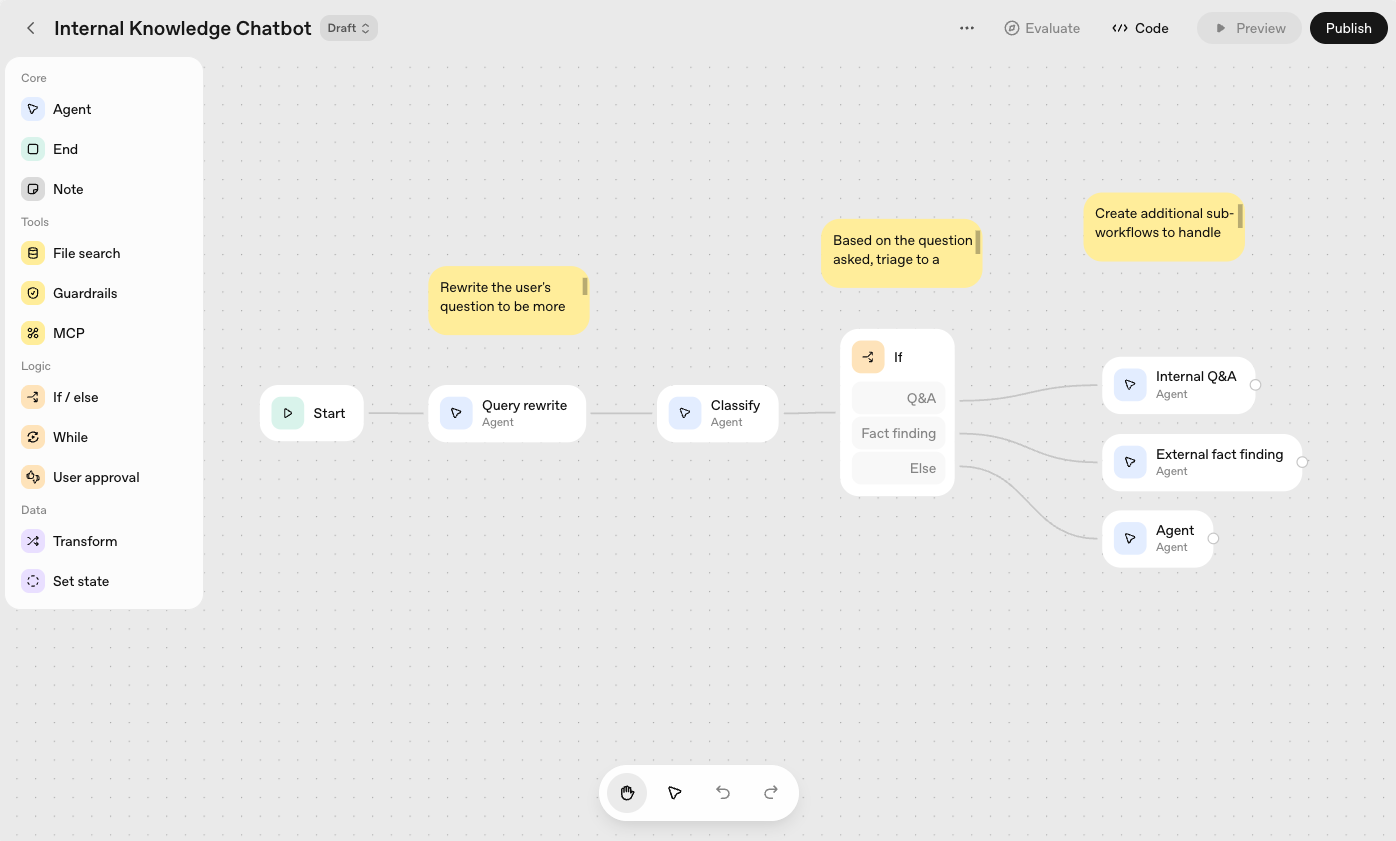
At its core, Agent Builder provides a visual canvas where users design workflows by dragging and connecting nodes. Each node represents a logical step, such as calling a model, making a decision, or interacting with data. For instance, you could create an agent that receives a question, checks a knowledge base, determines whether it needs external data, and then generates a complete response, all visually mapped on the canvas.
To help beginners, OpenAI includes ready-made templates for common workflows such as content summarization, customer support, and data retrieval. Once built, agents can be tested instantly within the same interface, showing how data flows through each step.
For advanced users, Agent Builder allows exporting workflows into code (Python or TypeScript), enabling further customization and integration. This bridges the gap between no-code simplicity and developer-level flexibility.
How OpenAI Agent Builder Differs from Zapier, n8n, and Make
You might wonder, “Haven’t we seen automation tools before?” Platforms like Zapier, Make, and n8n already let users build “if-this-then-that” workflows. But Agent Builder stands apart because it adds reasoning.
Traditional automation follows fixed rules: if A happens, then do B. Agent Builder, by contrast, infuses workflows with language-model intelligence, enabling agents to analyze context, choose actions dynamically, and adapt when conditions change. In short, they can think, not just act.
Another major difference is its deep integration with OpenAI’s models and infrastructure. Every step of reasoning and tool use is powered by the same intelligence that drives ChatGPT, but this time, you control how that intelligence behaves within your workflow.
Built-in evaluation, monitoring, and safety features provide visibility into decision-making and ensure agents act responsibly. For organizations, this means fewer integration headaches and greater transparency.
In summary, Agent Builder distinguishes itself through:
- Reasoning + Decision Logic: Context-aware actions instead of rigid rules.
- Native LLM Integration: Seamless connection between AI reasoning and external tools.
- Built-in Evaluation & Monitoring: Continuous tracing and optimization.
- Secure Connector Control: Centralized management of data access.
- Visual + Code Flexibility: Easy prototyping with the option for deeper customization.
Together, these elements signal a shift toward intelligent automation, where adaptable agents replace static, rule-based systems.
The Strengths and Limitations of OpenAI Agent Builder
OpenAI’s Agent Builder offers a fresh take on automation, merging the reasoning ability of language models with an intuitive, low-code interface. It allows teams to create intelligent workflows in hours rather than weeks, yet as with any new technology, it continues to evolve.
Key Strengths
Agent Builder’s biggest advantage is speed and accessibility. Its drag-and-drop canvas enables rapid experimentation and iteration without complex coding. It’s purpose-built for AI reasoning, allowing agents to interpret context, make decisions, and adapt to changing situations.
Its end-to-end integration with evaluation and safety features provides visibility into how agents operate, ensuring more reliable results. The hybrid visual-and-code model also bridges collaboration between developers and non-technical users.
Current Limitations
While impressive, Agent Builder is not yet a full replacement for established automation platforms. Its connector ecosystem is still expanding, and scheduling or event-triggering features are more limited than in mature tools like Zapier or n8n.
Because it runs on OpenAI’s infrastructure, users should also consider factors like cost, latency, and scalability for large deployments. And although the interface is user-friendly, designing complex agent logic still requires careful thought and testing.
Overall, OpenAI Agent Builder excels at intelligent reasoning workflows, while traditional automation tools remain stronger in broad orchestration and integration. For now, the best approach may be hybrid: letting Agent Builder handle the thinking, and proven platforms manage the doing.
Practical Use Cases of OpenAI Agent Builder
So, what can you actually build with OpenAI Agent Builder? The possibilities are broad and expanding. Here are a few examples of how enthusiasts and teams might use it:
- Customer Support Assistant: An agent can automatically read incoming messages, identify the type of issue, look up relevant account data, and craft a helpful reply, escalating to a human when needed.
- Research Summarizer: It can gather web data, analyze key insights, and produce a structured report in seconds.
- Sales Workflow Helper: The agent can process new leads, pull company details from APIs, and suggest personalized outreach messages.
- Data Reporter: It could fetch metrics from spreadsheets or databases, generate insights, and turn them into ready-to-share summaries or dashboards.
- Content Moderator: The system can evaluate user-generated content, apply moderation rules, and decide whether to approve, flag, or remove it.
Because these workflows are modular, you can start small, then layer in new actions and intelligence as your agent grows more capable. It’s a sandbox for experimentation that still feels safe and structured.
Looking Ahead: The Future of AgentKit
OpenAI’s roadmap points to an even more capable ecosystem. Future versions of AgentKit are expected to support multimodal inputs such as voice, images, and video, as well as a marketplace for connectors and templates built by the community.
There are also hints of support for external models and richer monitoring and safety frameworks, positioning AgentKit as a foundation for the next generation of AI-driven systems.
It’s easy to imagine a future where every organization, or even individual, has personalized AI agents tailored to their data and workflows. Agent Builder is an early but crucial step toward that vision.
Getting Started
If you’re curious to try Agent Builder yourself, OpenAI has made early access available through its platform. Getting started is refreshingly simple:
- Log in to your OpenAI account and open the Agent Builder interface.
- Browse through the templates to pick a starting point.
- Add or modify nodes to create your desired workflow.
- Use the test mode to run sample inputs and watch how your agent behaves.
- When ready, deploy or export your workflow, either as a hosted agent or as code for integration.
Within a few sessions, you’ll start to appreciate the balance of power and simplicity that Agent Builder offers. You don’t need to be a developer to design something useful, just someone with ideas about how intelligence can automate tasks.
Conclusion: Building the Future, One Agent at a Time
OpenAI Agent Builder and the broader AgentKit ecosystem redefine what it means to build with AI. By combining intuitive design, advanced reasoning, and built-in safety, OpenAI has narrowed the gap between imagination and implementation.
For AI enthusiasts, this isn’t just another tool; it’s a glimpse into the next era of creation. The software of the future won’t be written line by line but assembled — a blend of human intent, visual logic, and machine intelligence.
Agent Builder is the canvas for that new creative process, empowering anyone, regardless of coding background, to build agents that think, act, and help shape the world around them. It’s not just about making smarter tools. It’s about empowering people to build the AI that builds for them.
Frequently Asked Questions
1. What is OpenAI Agent Builder?
OpenAI Agent Builder is a visual tool that allows anyone to design and deploy intelligent AI agents without coding. Users can create workflows by connecting reasoning, actions, and external tools on an easy-to-use visual canvas.
2. How is Agent Builder different from other automation tools like Zapier or n8n?
Unlike traditional automation platforms that follow rigid “if-this-then-that” logic, Agent Builder integrates OpenAI’s language models to enable contextual reasoning. This means agents can understand, plan, and make decisions based on input, not just trigger pre-set actions.
3. Do I need programming skills to use OpenAI Agent Builder?
No. Agent Builder is designed for users of all skill levels. Its drag-and-drop interface makes it accessible to non-developers, while advanced users can export workflows into code (such as Python or TypeScript) for deeper customization.
4. What kinds of tasks can I automate with OpenAI Agent Builder?
You can create agents for a wide range of workflows, from customer support and content summarization to research assistance and data reporting. Essentially, any task that involves information gathering, reasoning, and output generation can be automated with Agent Builder.
5. Can I integrate Agent Builder with my existing business tools?
Yes. Through the Connector Registry, Agent Builder supports integration with APIs, databases, and external services. You can link it with CRMs, knowledge bases, or analytics tools to create agents that work seamlessly within your existing systems.
Related Posts

Beyond the AI Experiment: Join FabriXAI to Explore Agentic AI in Action

AI Is Not a Source of Truth: How to Use AI Without Overtrusting It